SDF Tracking Framework
SDF Tracking Framework
A Python framework for sensor data fusion and target tracking. Built around the formulations in Prof. Wolfgang Koch’s Tracking and Sensor Data Fusion. Every component — motion model, sensor, filter, trajectory, platform — sits behind a small explicit interface and is plug-compatible with the rest.
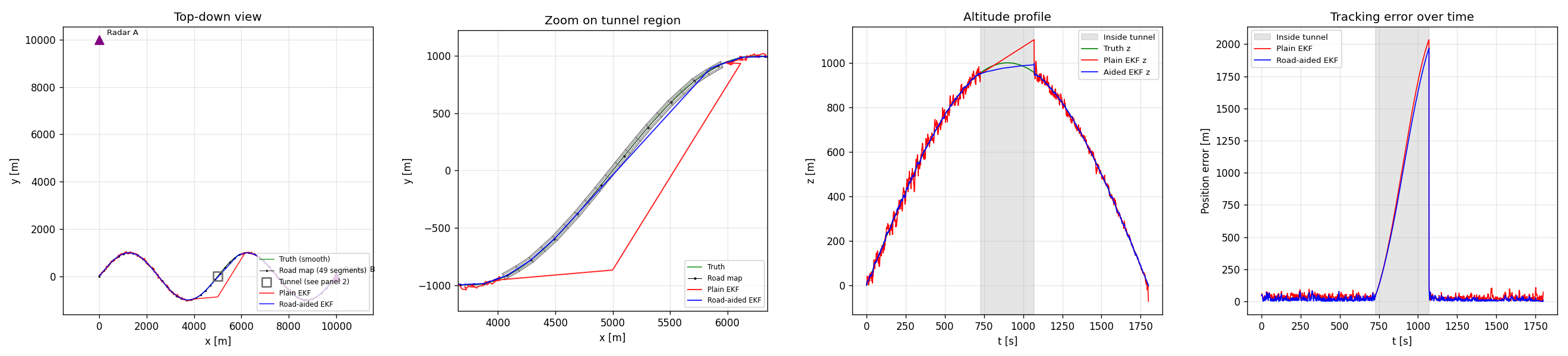
The headline scenario: a 3D mountain pass road with a 2.7 km tunnel midway, two stationary radars at (0, 10 km, 100 m) and (10 km, 0, 100 m), and the target traversing the road at constant speed. Inside the tunnel both radars lose the target; a road-aided EKF keeps the cross-track and altitude estimates close to the manifold while a plain EKF coasts on motion-model prediction alone and drifts. The error spike during the gap is the demonstration; the recovery on re-acquisition is the same filter design, no per-scenario tuning.
219 tests passing · Python 3.10+ · MIT license
Quick start
git clone <repo>
cd sensor-fusion-tracking
pip install -e .

# Run the headline example
python examples/road_with_tunnel.py
# → results/mountain_pass_with_tunnel.png

# Run the full test suite
pytest -v
To launch the interactive scenario builder dashboard:
pip install dash plotly playwright    # not part of the core deps
python -m dashboard                   # serves on http://127.0.0.1:8050
What it does
This framework implements the canonical building blocks of sensor data fusion, in a way meant to be read as much as run. If you’ve taken a tracking course, the names and roles will be familiar; if you haven’t, the inline documentation tries to bridge to the textbook.
The novel pieces are:
TerrainOcclusion/TunnelOcclusion— a road-aligned tubular occlusion model. Anchored to aPolygonalRoadMapby arc-length range, so the same tunnel definition works on straight and curved roads in 2D or 3D. Composes withDopplerBlindnessOcclusionviaCompositeOcclusion.PolygonalRoadMapwith explicit per-segment arc length (separate from the chord length), so the discretization-error variance σ_d is computed correctly when the polygon under-samples a curved road.RoadAidedExtendedKalmanFilter— EKF with a fictitious cross-track measurement from the road map applied at every step, regardless of whether the sensors fired. The mechanism by which the filter coasts through tunnels.- An interactive Dash dashboard (under
dashboard/) that lets you configure the trajectory, sensors, occlusion, filter, and road map through forms, run the simulation, and play back the result in 3D with a time slider — plus export the playback as an MP4.
Components
Motion models (src/sdf/motion_models/)
| Class | State | Dim | Process noise |
|---|---|---|---|
ConstantVelocity |
[x, vx, y, vy, (z, vz)] |
2D / 3D | DWN-A |
ConstantAcceleration |
[x, vx, ax, y, vy, ay, ...] |
2D / 3D | DWN-J |
CoordinatedTurn |
[x, vx, y, vy], ω fixed |
2D | DWN-A |
CoordinatedTurnUnknown |
[x, vx, y, vy, ω] |
2D | DWN-A + ω RW |
Sensors (src/sdf/sensors/)
CartesianPositionSensor— linear; direct noisy positionRadarSensor— range / bearing / (elevation), with proper angle-wrap on innovationGMTIRadarSensor— radar + range-rate, supports a movingPlatform
Each sensor optionally carries an OcclusionModel:
TunnelOcclusion— target in a road-aligned tube → no measurementDopplerBlindnessOcclusion— radial-velocity-dependent P_D suppression for GMTI clutter notchesCompositeOcclusion— OR-composition of several models
Filters (src/sdf/filters/)
KalmanFilter— linear measurements onlyExtendedKalmanFilter— local linearization for radar / GMTIRoadAidedExtendedKalmanFilter— EKF augmented by a road-map cross-track measurement, applied per step independently of sensor returnsIMMFilter— Interacting Multiple Models with arbitrary sub-filter list
Scenarios (src/sdf/scenarios/)
ConstantVelocityTrajectory,MountainPassTrajectory— analytic truthPolygonalRoadMap— polygon nodes with surveyed positions, declared σ on node coords, and explicit per-segment arc lengths- Sensor platforms:
StationaryPlatform,StraightFlight,CircleFlight,RacetrackFlight— analytic position and velocity at any t
Visualization (src/sdf/viz/)
tunnel_wireframe_segments(tunnel)— backend-agnostic line geometrydraw_tunnel_wireframe(ax, tunnel)— matplotlib helper for 2D or 3D axes
Examples
examples/ contains runnable scripts, each writing a PNG into results/:
| Example | What it shows |
|---|---|
minimal_kf_2d.py |
KF + Cartesian sensor, sanity baseline |
ekf_two_radars_3d.py |
EKF, 3D CV target, two stationary radars |
mountain_pass_two_radars.py |
3D winding road, EKF, no road map |
road_map_aided_tracking.py |
Same scenario + road-aided EKF for comparison |
road_with_tunnel.py |
Headline: mountain pass + tunnel, plain vs aided |
gmti_with_road_constraint.py |
GMTI Doppler blindness on a stopping target |
gmti_awacs_road.py |
GMTI on AWACS racetrack + 2 radars + road |
imm_aircraft.py |
IMM (CV + CT-left + CT-right) on a maneuvering target |
Dashboard
The interactive dashboard sits in the top-level dashboard/ directory
(deliberately outside the sdf package, to keep Dash and Plotly out of
the core dependency tree). It lets you configure a scenario through form
fields, run it, and watch the playback.

The scenario builder covers trajectory type and parameters, motion model type and parameters, an add/remove sensor list (each row is its own sensor type with its own form), occlusion model, filter type, road map density and node-position uncertainty, plus simulation seed and time step.
Clicking Run simulation produces:
- A 3D Plotly scene with truth, estimate, sensors, road map, and tunnel, animated frame-by-frame via play/pause and a time slider
- Three side panels: position error vs time, altitude profile, sensor detection timeline
- An Export MP4 button (requires
ffmpegon PATH) that writes the playback to a downloadable video file
Known issues
The dashboard’s scenario builder is more capable than it is correct. Specifically, in its current state:
- The road map is built and visualized when Enable road map is checked,
but the road-aided EKF doesn’t fully consume it through the dashboard
path — runs that work cleanly via
examples/road_with_tunnel.pyshow 2 km drift through the dashboard. The example is the reference; the dashboard runner needs an audit. - Side panels (error, altitude, detection) don’t sync with the 3D playback’s time slider — they show full time series and don’t move with playback. Fixing this means combining all panels into one Plotly subplots figure so frames are shared.
- Only
ConstantVelocityworks as the motion model from the dashboard; other motion models break at runtime due to state-layout mismatches between the trajectory and the filter. - Changing the road map’s node-position uncertainty (
sigma_nodes) has no observable effect on the tracking error. Most likely a symptom of issue 1. - The configured scenario parameters aren’t displayed under the playback; you have to remember what you set.
These are tracked for v7. The core framework (everything under src/sdf/)
is verified by the 219-test suite and the example scripts; the dashboard
is a viewer on top of that, and its bugs are in the viewer layer.
Layout
src/sdf/                        Core framework (no Dash dependency)
├── core/                       StateLayout, StateDistribution, Measurement, Track
├── motion_models/              CV, CA, CT (known and unknown ω)
├── sensors/                    Cartesian, Radar, GMTI, occlusion models
├── filters/                    KF, EKF, RoadAidedEKF, IMM
├── scenarios/                  Trajectories, road map, platforms
└── viz/                        Visualization helpers (matplotlib + geometry)

examples/                       Runnable demonstration scripts
tests/                          Framework tests (137, all passing)
dashboard/                      Plotly Dash app — outside the package
├── components/                 Spec-based component registries
├── ui/                         Form generator + playback view
├── tests/                      Dashboard tests (82, all passing)
├── schema.py                   ParameterSpec / ComponentSpec / ComponentChoice
├── simulation.py               Config dict → SimulationResult runner
├── mp4_export.py               matplotlib + ffmpeg MP4 rendering
├── app.py                      Dash app + callbacks
└── __main__.py                 python -m dashboard entry point

results/                        Generated PNGs and MP4s (gitignored content)
Architecture principles
Each layer talks to its neighbours through a single interface. A
MotionModel only owes the rest of the framework f(x, dt), F(x, dt),
and Q(dt), plus a StateLayout describing which indices are which.
A Sensor owes h(x), H(x), and a measure() method that handles
detection probability and occlusion uniformly. A Filter consumes both
through their interfaces and never knows about ground truth.
StateLayout is the small piece of cleverness that holds it together.
It decouples state-vector indices from semantics, so a sensor that needs
“the position part of the state” can ask the layout for position_idx
rather than hardcoding (0, 2) or (0, 2, 4). This is what makes the
same Sensor class work for a 2D CV target and a 3D CA target without
caring about the difference.
Adding a new filter, sensor, motion model, or trajectory is a single new class implementing its ABC, plus tests; the existing components don’t need to know it exists.
Disclaimer
AI tools such as Gemini and Claude were used in the development of this project.
Attribution
Developed by Fawwaz Bin Tasneem (MSc CS, University of Bonn) as a portfolio project, extending the work done as a part of the course Introduction to Sensor Data Fusion.
Built iteratively across six versions; the architecture (state layout, small interfaces, plug-compatible components) settled around v3 and has stayed stable since. Each release ran a green test suite end to end.
License
MIT.
Publishing to GitHub Pages. This repository is structured to serve as
its own Pages site: _config.yml at the root configures Jekyll with the
minima theme, and README.md is rendered as the index. To enable, go
to Settings → Pages, set Source to Deploy from a branch, branch
main, folder / (root). No workflow file is needed.